

On November 12, 2026, a widespread Microsoft 365 outage stopped Outlook, Teams and other Microsoft services for businesses across Canada. Our own Outlook stopped working around noon Eastern, and it still would not open at midnight. If your team spent the afternoon refreshing an empty inbox, you saw how quickly one outage can freeze customer service, approvals and scheduling.
The outage itself did not destroy anyone’s data. It was a warning shot. It showed how much a business depends on one cloud platform, and it raised a harder question: if your email or SharePoint files were deleted tomorrow, could you get them back?
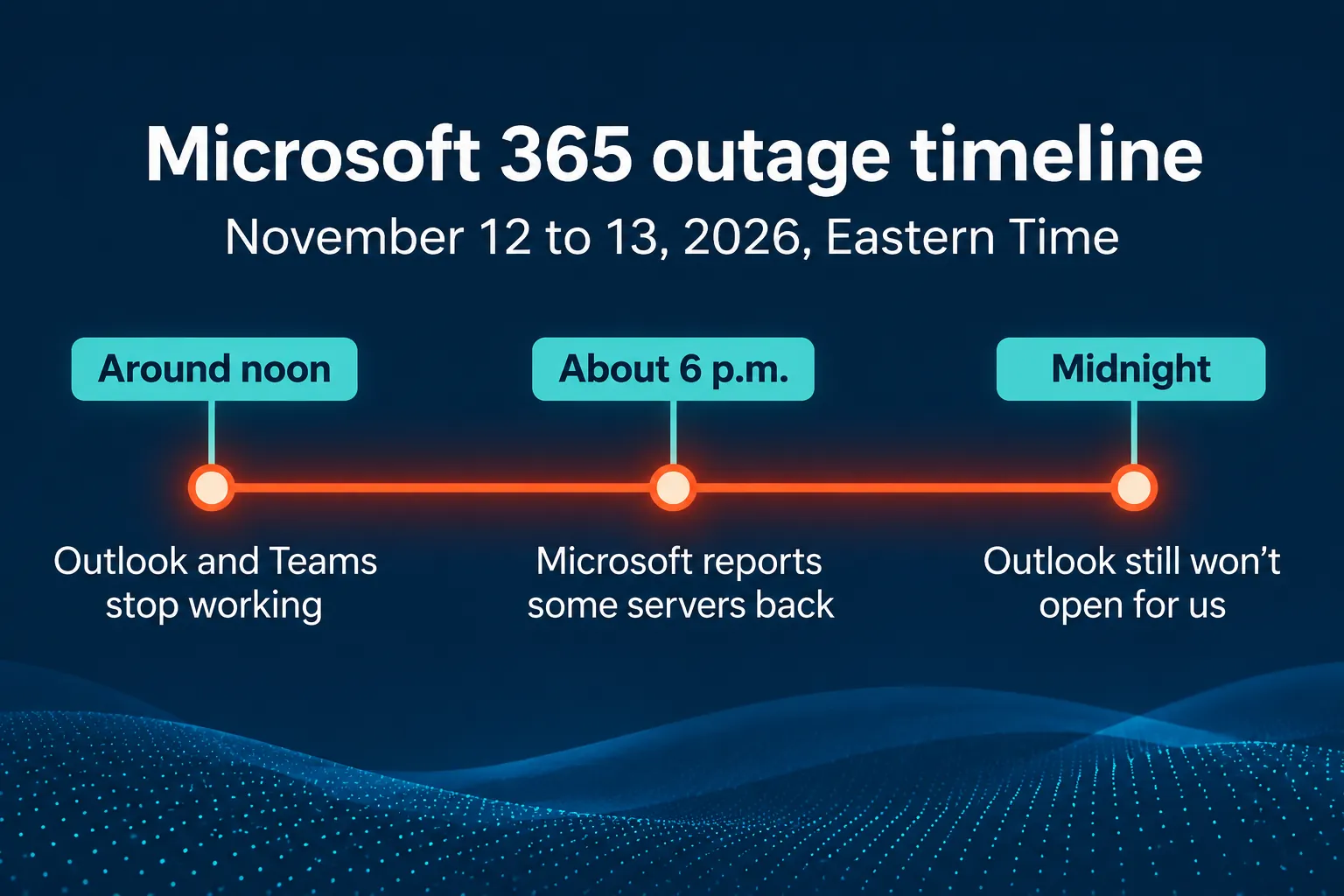
What happened during the Microsoft 365 outage
Problems began around midday Eastern Time. Outlook problem reports on Downdetector peaked in the early afternoon, and Microsoft said in the evening that it was still returning affected servers to service and had seen only limited recovery (Global News, Reuters). In our office, Outlook still would not open at midnight.
When Outlook won’t open, the damage is not only to email. Quotes wait, approvals stall, meetings are missed, and customers who cannot reach you may call someone else. When Teams goes down at the same time, staff lose their backup channel too.
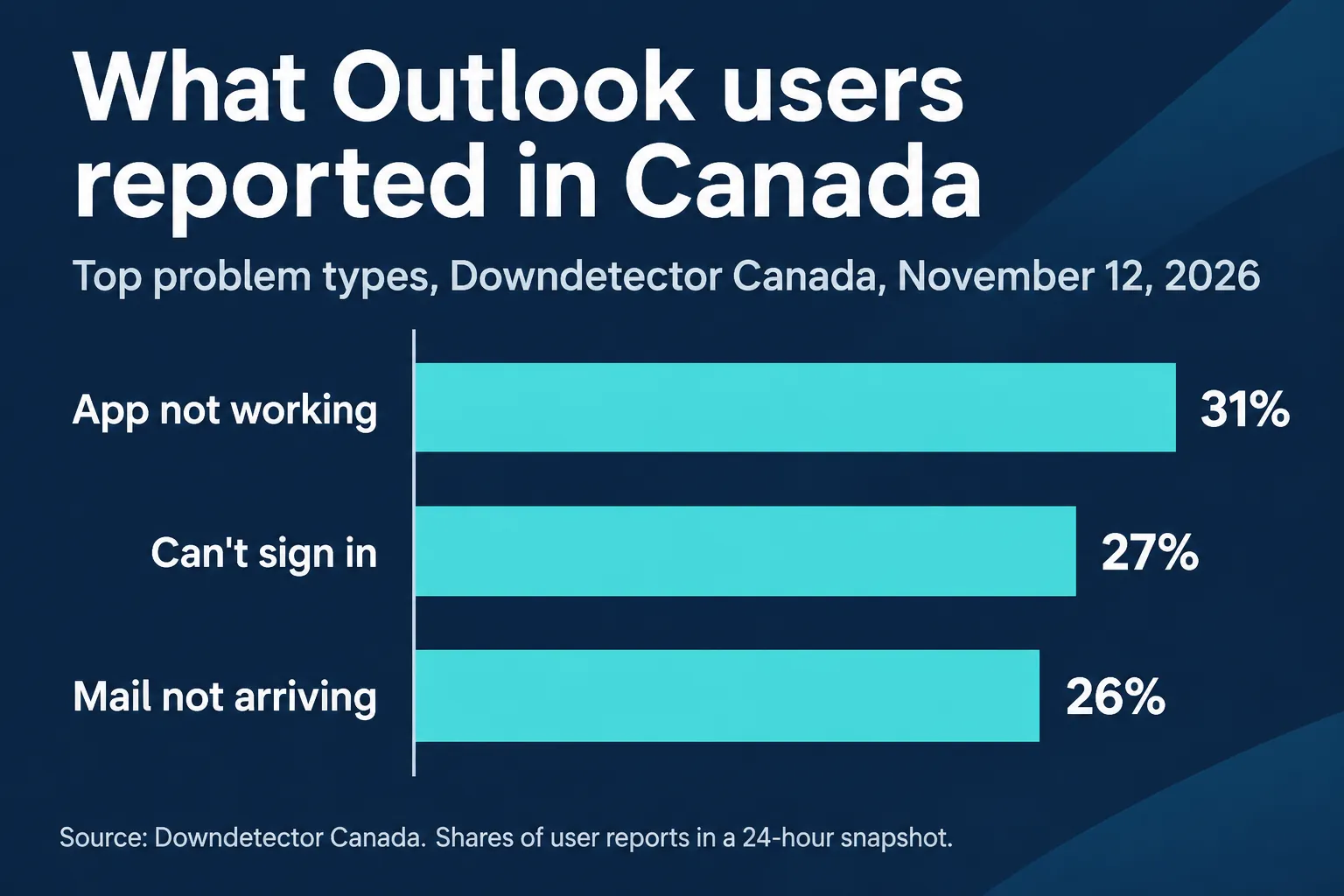
What Outlook users in Canada reported
In the rolling 24-hour snapshot we reviewed on Downdetector Canada, the top problem types were the app not working (31%), sign-in problems (27%) and mail not arriving (26%). These are shares of user-submitted reports in that snapshot, not a count of affected businesses.
Could your email and SharePoint files be lost for good?
News coverage of the November 12 outage described access and mail delivery problems. It did not report a cyberattack or permanent loss of stored data.
The real risk is a different day: an employee deletes the wrong folder, a former staff member wipes a mailbox, a phishing email leads to a compromised account, or ransomware encrypts shared files. Microsoft 365 keeps deleted items only for a limited time. Once those recovery windows close, and no retention policy or separate backup kept a copy, the data may be gone for good. Microsoft itself documents recovery from large-scale accidental and malicious deletion as a reason for its separate backup service (Microsoft 365 Backup FAQ).
One more point many businesses miss: if a message never reached your mailbox during an outage, no mailbox backup can recover it. After service returns, confirm that critical messages arrived and ask senders to resend anything that failed.
How long Microsoft 365 and Google Workspace keep deleted data
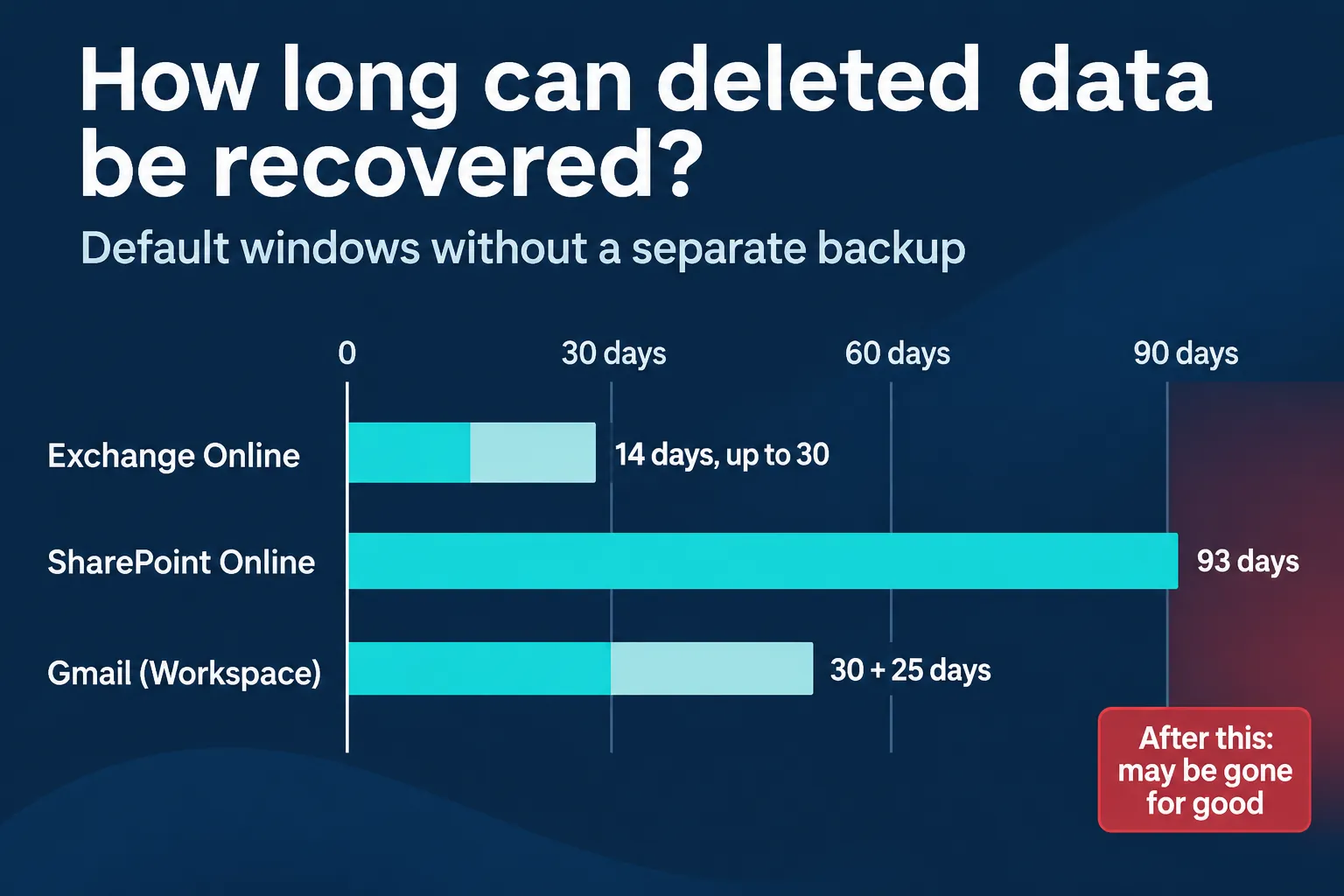
Exchange Online (Outlook email)
Items removed from Deleted Items are generally recoverable for 14 days by default, and an administrator can extend this to 30 days. Retention policies or holds can keep items longer (Microsoft Learn: Recoverable Items).
SharePoint Online and OneDrive
Deleted items generally stay in the recycle bins for up to 93 days from the original deletion, with some exceptions. Microsoft Support can accept a site collection restore request only within a limited window (Microsoft Learn: SharePoint recovery).
Google Workspace Gmail
Messages generally stay in Trash for up to 30 days. After that, administrators generally have up to 25 more days to restore them. Google Vault can preserve eligible messages when retention rules or holds apply (Google Workspace Admin Help).
Microsoft also sells a separate Microsoft 365 Backup service, and independent backup services exist as well. The right choice depends on two questions: how far back do you need to restore, and how fast do you need it back?
4 steps to take before the next Microsoft 365 outage
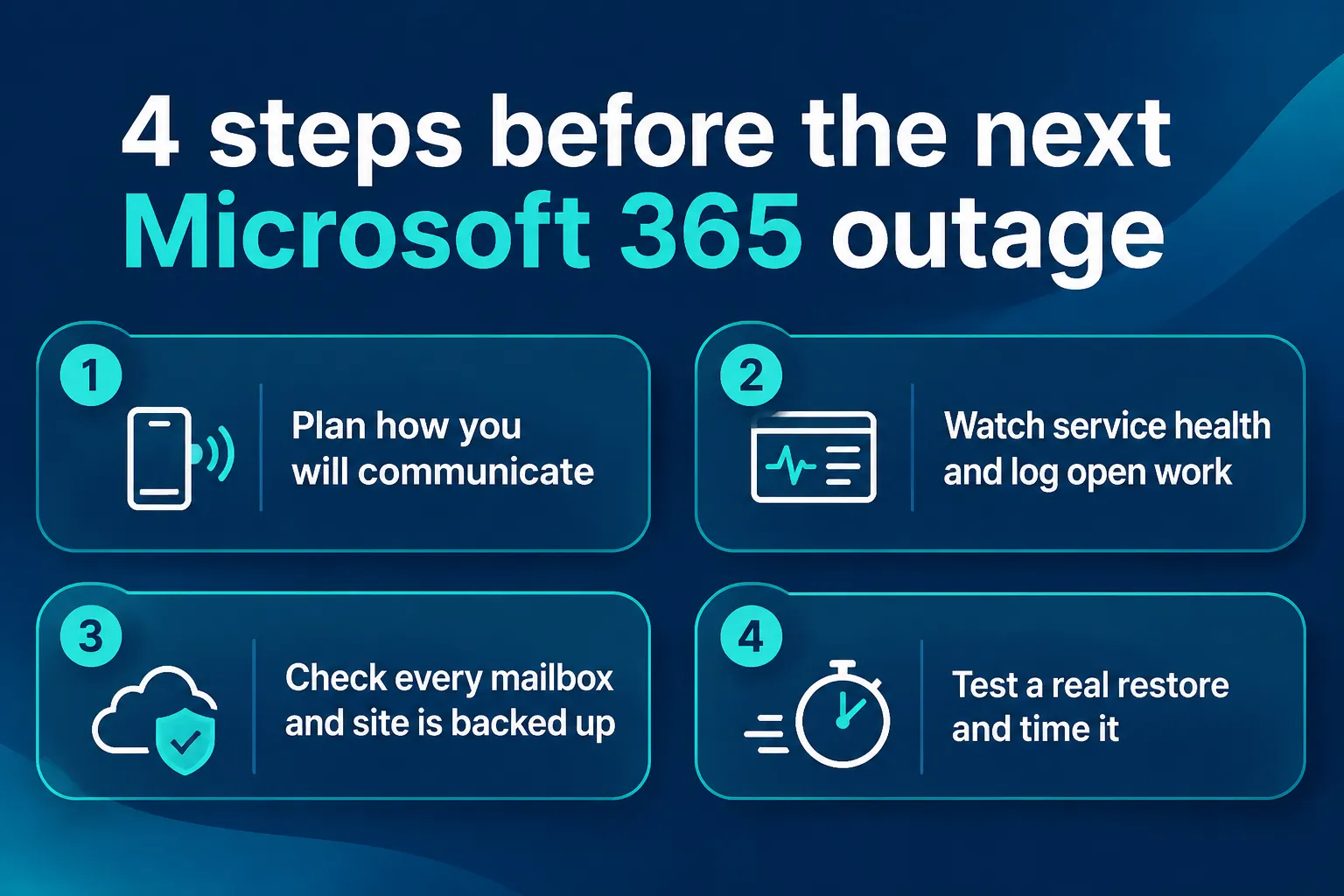
- Plan how you will communicate. Keep a contact list you can reach without Outlook, agree on a fallback such as phone or SMS, and name one person who updates staff and customers.
- Check service health and track unresolved work. Your administrator can follow incidents in Microsoft 365 Service Health, and anyone can check Microsoft’s public status page. Write down critical emails, approvals and requests that need follow-up.
- Verify your backup coverage. Check critical mailboxes, shared mailboxes, SharePoint libraries, OneDrive accounts and files shared in Teams. Make sure new users and new sites are included and that their backups complete.
- Test a real restore. Recover one message from a shared mailbox and one document from a critical SharePoint library. Record how long it took, how recent the copy was and who on your team can do it.
How BA Consulting protects your business

Since 2006, BA Consulting has helped more than 300 businesses in Toronto and the GTA keep their systems running and their data safe. An outage like this one is exactly when our clients call us, and our response time ranges from immediate to between 15 minutes and 4 hours. Our approach is simple: prevent the problem where we can, and when something does go wrong, make sure you can recover.
Managed IT services and Microsoft 365 support
Our managed IT services in Toronto include Microsoft 365 support: we find out whether a problem is in your office or with the provider, coordinate escalation, and after an outage we help verify sign-in, access to business files and mail delivery. With remote assistance we can often start working on the problem right away.
Complete cybersecurity services
Our cyber security services cover the full picture: risk assessments and security policy, compliance guidance, threat detection and response, cloud security for Microsoft 365 and Azure, and security awareness training with phishing simulations, because most attacks still start with one click. Our team holds certifications including CompTIA Security+ and works with the NIST Cybersecurity Framework.
24/7 managed endpoint security (EDR)
We use ConnectWise Managed EDR, which combines automated endpoint monitoring and AI-assisted alert analysis with a Security Operations Center staffed around the clock. Analysts investigate suspicious activity on managed devices and help contain and fix confirmed threats.
Managed Microsoft 365 backup
Our business cloud backup for Microsoft 365 uses Axcient x360Cloud, billed monthly per user. Depending on configuration, it can protect Exchange Online email, calendars and contacts, shared mailboxes, OneDrive, SharePoint document libraries and Teams files stored in SharePoint and OneDrive. We check that backups complete, and we help you test and perform restores. Learn more about our cloud services or read our Microsoft 365 security FAQ for Toronto businesses.
Frequently asked questions
How do I know if Microsoft 365 is down or if the problem is only in my office?
Check Microsoft’s public status page and, if you are an administrator, Service Health in the Microsoft 365 admin center. Try Outlook on the web as well. If the web version works but the app does not, the problem is likely on your computer. If you are unsure, your IT provider can confirm it quickly.
Why won’t Outlook open on my computer?
During a provider outage, the cause is on Microsoft’s side and you need to wait for service to return. On a normal day, Outlook can fail to open because of a damaged profile, an add-in, a large offline data file or a connection problem. Outlook on the web is a quick way to keep working while the app is fixed.
Does Microsoft back up my Microsoft 365 data?
Microsoft keeps its service running and offers built-in retention and recycle bins, but deleted items are kept only for a limited time. For longer or point-in-time recovery, businesses add retention policies, Microsoft’s paid backup service or an independent backup service.
Can emails be lost during a Microsoft 365 outage?
Coverage of the November 12 outage did not report loss of stored mail. However, a message that never reached your mailbox cannot be restored from a mailbox backup. After an outage, confirm that critical messages arrived and ask senders to resend anything that failed.
How long does Exchange Online keep deleted emails?
By default, items removed from Deleted Items are recoverable for 14 days, and administrators can extend this to 30 days. Retention policies or holds can keep items longer. After that window, a separate backup is the only way to get them back.
What should a business do during a Microsoft 365 outage?
Switch to your fallback channel, such as phone or SMS, tell customers you are aware of the problem, follow Microsoft’s status updates, and keep a list of emails and approvals to follow up. When service returns, verify sign-in, file access and mail delivery.
Could you restore a critical mailbox or SharePoint file today?
If you are not sure, now is the time to find out, before the next outage, the next deleted folder or the next phishing email. Contact BA Consulting to review what is backed up, how far back you can restore and how your team will stay in touch when Microsoft 365 is down.
Microsoft 365, Outlook, Teams, SharePoint, OneDrive and Exchange are trademarks of Microsoft Corporation. Gmail and Google Workspace are trademarks of Google LLC. BA Consulting is an independent IT services provider and is not affiliated with or endorsed by Microsoft or Google. Outage details are based on our own observations and public reports at the time of writing. This article is general information, not legal or technical advice for a specific situation.